Wearable scanners and terminals: hands-free warehouse work
Ring and hand-worn scanners and wearable terminals from Zebra and Honeywell: how they pair with a terminal, which tasks benefit and when to skip them.
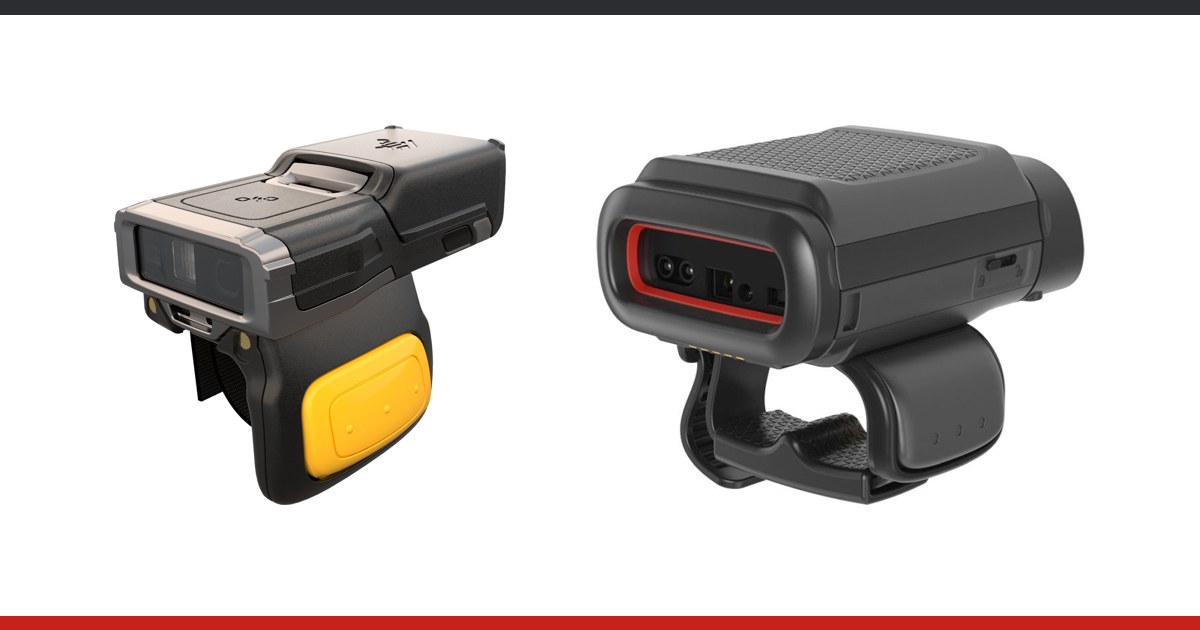
In picking, sorting and loading the operator needs both hands: one holds the goods, the other opens a box or moves a parcel. A handheld scanner has to be put down at every step, and across hundreds of scans per shift those seconds add up. The alternative is a scanner worn on a finger or on the hand, linked to a terminal that runs the application and holds the data.
How the pair works
The scanner reads the code, and the terminal or tablet runs the warehouse application: it shows the task, receives the code and confirms the location and quantity. The link between the two is usually Bluetooth. In practice the operator reads the instruction on the terminal (on the belt, on the forearm or in a pocket) and scans without taking it out. Range, battery and Bluetooth reliability are covered separately in the piece on wireless Bluetooth scanners, so here we look at ergonomics and choosing the type.
Three kinds of worn device
| Type | Examples from the range | Role |
|---|---|---|
| Ring scanner | Zebra RS5100, RS6100; Honeywell 8675i | Scans only; the application runs on another terminal |
| Hand-worn scanner with display | Honeywell 8680i | Scans and shows information at the point of scanning |
| Wearable terminal | Zebra WS501, WT6400, WT5400 | Screen and application on the operator's body |
Rings: a small scanner and a separate terminal
The Zebra RS5100 is a 2D ring imager weighing 70 g, rated IP65 and for drops from 1.8 m. It comes with a standard 480 mAh battery or an extended 735 mAh one, and with the extended battery it works down to -20 °C. The Zebra RS6100 adds the IntelliFocus engine, which reads from 6.4 cm to 1.8 m (UPC 13 mil), a multicolour LED useful for sorting, and NFC tap-to-pair. The Honeywell 8675i starts at 63 g in the SR version, with Bluetooth 5.1, NFC pairing and, according to the manufacturer, up to 12,000 scans in a 10-hour shift. SR and FlexRange variants exist.
The 8680i: a scanner with a display
The Honeywell 8680i is a mini computer worn on the hand or forearm, with an imager and a display. It weighs 151 g with the slim 1200 mAh battery and 168 g with the extended 2160 mAh one; the advanced model also has Wi-Fi. It suits operators who want to see the confirmation right where they scan.
Wearable terminals
The Zebra WS501 combines terminal and ring scanner in one device worn on two fingers or on the back of the hand, with a 2-inch screen and a removable hot-swap battery. The Zebra WT6400 is a 4.7-inch hand-worn terminal; scanning is done with Zebra rings over Bluetooth (RS2100, RS5100, RS6100) or wired ones (RS4000, RS5000). The Zebra WT5400 has a slim profile for retail and no scanner of its own: it pairs over NFC with the RS2100, RS5100 or RS6100. These models are listed in the wearable terminals category on terminale-mobile.md.
Ergonomics: what to check by hand
Weight matters over a full shift: the rings weigh 63-70 g, the Honeywell 8680i 151-168 g depending on the battery. It also matters how the device sits on the finger or hand, where the trigger is (on the WS501 it is ambidextrous, so it suits left- and right-handed people), and whether the operator can work in the gloves used in the warehouse. That is why the devices should be put in the hands of the people who will wear them, rather than chosen from the datasheet alone.
Which operations gain most
- Wave picking: the operator takes goods with both hands and scans on the move
- Parcel sorting: an LED or a beep confirms each read without looking at a screen
- Loading and unloading: hands stay free for pallets and boxes
- Shelf inventory: many repeated scans without lifting a terminal to every code
Battery swaps during a shift
The ring and the terminal have separate batteries, and both must last the shift. For each device check the stated runtime and whether the battery can be changed without powering off: for the WS501 and WT6400 the manufacturer specifies hot swap, and on the WT5400 the battery is replaced without taking the device off the arm. For 8-10 hour shifts plan spare batteries or a charging cradle at each station, and check in the pilot whether the device lasts to the end of the shift.
When it is not the answer
A worn device will not help if the operator scans few codes, works only occasionally or often types quantities on a keypad: there a classic mobile terminal or a handheld scanner is simpler. If codes are far away, a standard ring may not be enough and a long-range model is chosen. How scanning ties into picking tasks in a warehouse system can be seen in the description of the WMS picking module.
How to proceed
Pick two or three typical workstations, give operators the pairs to test for a full shift, and measure scans, errors and comfort feedback. Rings and other worn devices are collected in the wearable scanners category. Request a quote, and we will confirm the exact compatibility with your terminal and application in the quote.